Note
Go to the end to download the full example code. or to run this example in your browser via Binder
Massively univariate analysis of a calculation task
This example shows how to perform a standard
ANOVA with scikit-learn and Nilearn.
Using sklearn.feature_selection.f_regression,
a massively univariate F-test
is performed; we then threshold and plot the resulting
Bonferroni-corrected p-values.
dataset
This example uses the calculation-task contrast maps
from the Localizer dataset,
accessed via the
fetch_localizer_contrasts fetcher.
Here we only fetch a single contrast of the broader Localizer task; note that the same fetcher also gives access to many other contrast maps as well as external, subject-related or behavioral variates. Please refer to the Massively univariate analysis of a motor task example for an illustration of how to use these external variates in other massively univariate analyses.
Load Localizer “calculation task” contrast maps
Here, we only use contrast maps from a subset of subjects
in order to speed up computation.
Paths on disk for all contrast maps are accessed
via the cmaps attribute.
We also define tested_var as an array of ones of shape
(n_subjects, 1).
import numpy as np

from nilearn import datasets

n_subjects = 20
localizer_dataset = datasets.fetch_localizer_contrasts(
    ["calculation (auditory and visual cue)"],
    n_subjects=n_subjects,
)
cmap_filenames = localizer_dataset.cmaps

tested_var = np.ones(
    n_subjects,
)
[fetch_localizer_contrasts] Dataset directory found: /home/runner/work/nilearn/nilearn/nilearn_data/brainomics_localizer
Extract voxelwise data
Next, we use a NiftiMasker
to extract voxelwise values for the
calculation task contrast maps
for each subject.
We also apply a light processing on this data,
including smoothing with a 5mm FWHM kernel.
from nilearn.maskers import NiftiMasker

nifti_masker = NiftiMasker(
    smoothing_fwhm=5, memory="nilearn_cache", memory_level=1, verbose=1
)
fmri_masked = nifti_masker.fit_transform(cmap_filenames)
[NiftiMasker.wrapped] Loading data from [
 cmaps_Auditory&Vis...,
         ...
 cmaps_Auditory&Vis...,
]
[NiftiMasker.wrapped] Computing mask
________________________________________________________________________________
[Memory] Calling nilearn.masking.compute_background_mask...
compute_background_mask([ '/home/runner/work/nilearn/nilearn/nilearn_data/brainomics_localizer/brainomics_data/S01/cmaps_Auditory&VisualCalculation.nii.gz',
  '/home/runner/work/nilearn/nilearn/nilearn_data/brainomics_localizer/brainomics_data/S02/cmaps_Auditory&VisualCalculation.nii.gz',
  '/home/runner/work/nilearn/nilearn/nilearn_data/brainomics_localizer/brainomics_data/S03/cmaps_Auditory&VisualCalculation.nii.gz',
  '/home/runner/work/nilearn/nilearn/nilearn_data/brainomics_localizer/brainomics_data/S04/cmaps_Auditory&VisualCalculation.nii.gz',
  '/home/runner/work/nilearn/nilearn/nilearn_data/brainomics_localizer/brainomics_data/S05/cmaps_Auditory&VisualCalculation.nii.gz',
  '/home/runner/work/nilearn/nilear..., verbose=0)
__________________________________________compute_background_mask - 0.1s, 0.0min
[NiftiMasker.wrapped] Resampling mask
________________________________________________________________________________
[Memory] Calling nilearn.image.resampling.resample_img...
resample_img(<nibabel.nifti1.Nifti1Image object at 0x720321c0df90>, target_affine=None, target_shape=None, copy=False, interpolation='nearest')
_____________________________________________________resample_img - 0.0s, 0.0min
[NiftiMasker.wrapped] Finished fit
________________________________________________________________________________
[Memory] Calling nilearn.maskers.nifti_masker.filter_and_mask...
filter_and_mask([ '/home/runner/work/nilearn/nilearn/nilearn_data/brainomics_localizer/brainomics_data/S01/cmaps_Auditory&VisualCalculation.nii.gz',
  '/home/runner/work/nilearn/nilearn/nilearn_data/brainomics_localizer/brainomics_data/S02/cmaps_Auditory&VisualCalculation.nii.gz',
  '/home/runner/work/nilearn/nilearn/nilearn_data/brainomics_localizer/brainomics_data/S03/cmaps_Auditory&VisualCalculation.nii.gz',
  '/home/runner/work/nilearn/nilearn/nilearn_data/brainomics_localizer/brainomics_data/S04/cmaps_Auditory&VisualCalculation.nii.gz',
  '/home/runner/work/nilearn/nilearn/nilearn_data/brainomics_localizer/brainomics_data/S05/cmaps_Auditory&VisualCalculation.nii.gz',
  '/home/runner/work/nilearn/nilear...,
<nibabel.nifti1.Nifti1Image object at 0x720321c0df90>, { 'clean_args': None,
  'clean_kwargs': {},
  'cmap': 'gray',
  'detrend': False,
  'dtype': None,
  'high_pass': None,
  'high_variance_confounds': False,
  'low_pass': None,
  'reports': True,
  'runs': None,
  'smoothing_fwhm': 5,
  'standardize': None,
  'standardize_confounds': True,
  't_r': None,
  'target_affine': None,
  'target_shape': None}, memory_level=1, memory=Memory(location=nilearn_cache/joblib), verbose=1, confounds=None, sample_mask=None, copy=True, sklearn_output_config=None)
[NiftiMasker.wrapped] Loading data from <nibabel.nifti1.Nifti1Image object at 0x720359ccd5d0>
[NiftiMasker.wrapped] Smoothing images
[NiftiMasker.wrapped] Extracting region signals
[NiftiMasker.wrapped] Cleaning extracted signals
__________________________________________________filter_and_mask - 0.3s, 0.0min
ANOVA (parametric F-scores)
We use sklearn.feature_selection.f_regression to perform
a one-sample F-test at every voxel and keep only those
which are significant, as assessed via a simple F-score.
Assuming that no such effect exists,
the F-test follows a
Fisher distribution,
which yields voxelwise p-values that can be used to assert
significance.
from sklearn.feature_selection import f_regression

_, pvals_anova = f_regression(
    fmri_masked,
    tested_var,
    center=False,  # ``center=False`` to not remove intercept.
)
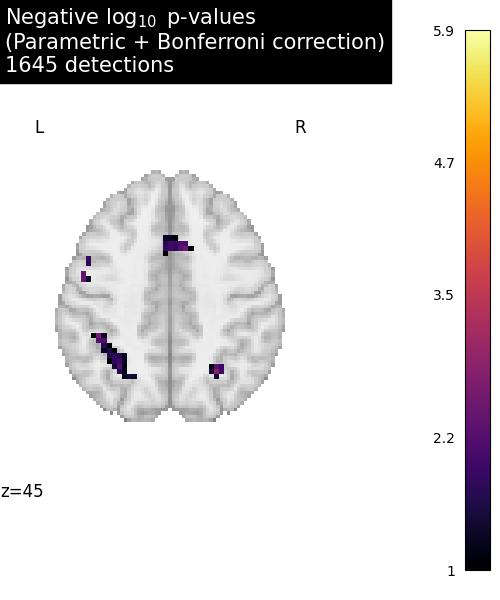
We calculate the negative log of the p-values for thresholding and visualization.
from nilearn.image import get_data

pvals_anova *= fmri_masked.shape[1]
pvals_anova[np.isnan(pvals_anova)] = 1
pvals_anova[pvals_anova > 1] = 1
neg_log_pvals_anova = -np.log10(pvals_anova)
neg_log_pvals_anova_unmasked = nifti_masker.inverse_transform(
    neg_log_pvals_anova
)

threshold = -np.log10(0.1)  # 10% corrected
n_detections = (get_data(neg_log_pvals_anova_unmasked) > threshold).sum()
[NiftiMasker.inverse_transform] Computing image from signals
________________________________________________________________________________
[Memory] Calling nilearn.masking.unmask...
unmask(array([-0., ..., -0.]), <nibabel.nifti1.Nifti1Image object at 0x720321c0df90>)
___________________________________________________________unmask - 0.0s, 0.0min
Visualization
Since we are plotting negative log p-values and using a threshold equal to 1, it corresponds to corrected p-values lower than 10%, meaning that there is less than 10% probability to make a single false discovery (i.e., a 90% chance that we make no false discovery at all).
import matplotlib.pyplot as plt

from nilearn.plotting import plot_stat_map, show

title = (
    "Negative $\\log_{10}$ p-values"
    "\n(Parametric + Bonferroni correction)"
    f"\n{n_detections} detections"
)

# We plot a single slice to highlight those voxels
# which survive the one-sample F-test.
plotted_slice = 45
fig = plt.figure(figsize=(5, 6), facecolor="w")

# Plot ANOVA p-values
display = plot_stat_map(
    neg_log_pvals_anova_unmasked,
    threshold=threshold,
    display_mode="z",
    cut_coords=[plotted_slice],
    figure=fig,
    cmap="inferno",
    vmin=threshold,
    title=title,
)

show()
Total running time of the script: (0 minutes 3.491 seconds)
Estimated memory usage: 278 MB
