Note
Go to the end to download the full example code. or to run this example in your browser via Binder
Extracting signals from brain regions using the NiftiLabelsMasker
This simple example shows how to extract signals from functional
fMRI data and brain regions defined through an atlas.
More precisely, this example shows how to use the
NiftiLabelsMasker object to perform this
operation in just a few lines of code.
Retrieve the brain development functional dataset
We start by fetching the brain development functional dataset and we restrict the example to one subject only.
from nilearn.datasets import fetch_atlas_harvard_oxford, fetch_development_fmri

dataset = fetch_development_fmri(n_subjects=1)
func_filename = dataset.func[0]

# print basic information on the dataset
print(f"First functional nifti image (4D) is at: {func_filename}")
[fetch_development_fmri] Dataset directory found: /home/runner/work/nilearn/nilearn/nilearn_data/development_fmri
First functional nifti image (4D) is at: /home/runner/work/nilearn/nilearn/nilearn_data/development_fmri/sub-pixar123_task-pixar_space-MNI152NLin2009cAsym_desc-preproc_bold.nii.gz
Load an atlas
We then load the Harvard-Oxford atlas to define the brain regions and the first label correspond to the background.
atlas = fetch_atlas_harvard_oxford("cort-maxprob-thr25-2mm")
print(f"The atlas contains {len(atlas.labels) - 1} non-overlapping regions")
[fetch_atlas_harvard_oxford] Dataset directory found: /home/runner/work/nilearn/nilearn/nilearn_data/fsl
The atlas contains 48 non-overlapping regions
Instantiate the mask and visualize atlas
Instantiate the masker with label image and label values.
We use standardize="zscore_sample"
so that the extracted time-series are shifted to zero mean
and scaled to unit variance.
detrend=True is used to remove linear trends in the signal.
from nilearn.maskers import NiftiLabelsMasker

masker = NiftiLabelsMasker(
    atlas.maps,
    lut=atlas.lut,
    standardize="zscore_sample",
    detrend=True,
    verbose=1,
)
Visualize the atlas
We need to call fit prior to generating the mask.
We can then generate a report to visualize the atlas.
Here we use the ‘brainsprite’ engine
that gives an interactive visualization
instead of the static one generated
by the matplotlib engine.
Note
The generated report can be:
displayed in a Notebook,
opened in a browser using the
.open_in_browser()method,or saved to a file using the
.save_as_html(output_filepath)method.
masker.fit()

report = masker.generate_report(engine="brainsprite")
report
[NiftiLabelsMasker.fit] Loading regions from <nibabel.nifti1.Nifti1Image object at 0x7fbe3a183390>
[NiftiLabelsMasker.fit] Finished fit
/home/runner/work/nilearn/nilearn/.tox/doc/lib/python3.11/site-packages/numpy/core/fromnumeric.py:771: UserWarning:

Warning: 'partition' will ignore the 'mask' of the MaskedArray.

/home/runner/work/nilearn/nilearn/examples/06_manipulating_images/plot_nifti_labels_simple.py:73: UserWarning:

No image provided to fit in NiftiLabelsMasker. Plotting ROIs of label image on the MNI152Template for reporting.
Fitting the masker on data and generating a report
We can again generate a report, but this time, the provided functional image is displayed with the ROI of the atlas. The report also contains a summary table giving the region sizes in mm3.
[NiftiLabelsMasker.fit] Loading data from sub-pixar123_task-...
[NiftiLabelsMasker.fit] Loading regions from <nibabel.nifti1.Nifti1Image object at 0x7fbe3a183390>
[NiftiLabelsMasker.fit] Resampling regions
[NiftiLabelsMasker.fit] Finished fit
NiftiLabelsMasker Class for extracting data from Niimg-like objects using labels of non-overlapping brain regions. NiftiLabelsMasker is useful when data from non-overlapping volumes should be extracted (contrarily to :class:`nilearn.maskers.NiftiMapsMasker`). Use case: summarize brain signals from clusters that were obtained by prior K-means or Ward clustering. For more details on the definitions of labels in Nilearn, see the :ref:`region` section.

This report shows the regions defined by the labels of the mask.
The masker has 48 different non-overlapping regions.
Regions summary
| label value | region name | size (in mm^3) | relative size (in %) |
|---|---|---|---|
| 1 | Frontal Pole | 123008 | 11.76 |
| 2 | Insular Cortex | 18240 | 1.74 |
| 3 | Superior Frontal Gyrus | 40064 | 3.83 |
| 4 | Middle Frontal Gyrus | 42048 | 4.02 |
| 5 | Inferior Frontal Gyrus, pars triangularis | 8576 | 0.82 |
| 6 | Inferior Frontal Gyrus, pars opercularis | 10880 | 1.04 |
| 7 | Precentral Gyrus | 68352 | 6.53 |
| 8 | Temporal Pole | 38016 | 3.63 |
| 9 | Superior Temporal Gyrus, anterior division | 4160 | 0.40 |
| 10 | Superior Temporal Gyrus, posterior division | 14272 | 1.36 |
| 11 | Middle Temporal Gyrus, anterior division | 6528 | 0.62 |
| 12 | Middle Temporal Gyrus, posterior division | 20224 | 1.93 |
| 13 | Middle Temporal Gyrus, temporooccipital part | 15680 | 1.50 |
| 14 | Inferior Temporal Gyrus, anterior division | 5248 | 0.50 |
| 15 | Inferior Temporal Gyrus, posterior division | 15616 | 1.49 |
| 16 | Inferior Temporal Gyrus, temporooccipital part | 11648 | 1.11 |
| 17 | Postcentral Gyrus | 54400 | 5.20 |
| 18 | Superior Parietal Lobule | 24000 | 2.29 |
| 19 | Supramarginal Gyrus, anterior division | 14016 | 1.34 |
| 20 | Supramarginal Gyrus, posterior division | 17600 | 1.68 |
| 21 | Angular Gyrus | 19328 | 1.85 |
| 22 | Lateral Occipital Cortex, superior division | 78272 | 7.48 |
| 23 | Lateral Occipital Cortex, inferior division | 33600 | 3.21 |
| 24 | Intracalcarine Cortex | 11008 | 1.05 |
| 25 | Frontal Medial Cortex | 7744 | 0.74 |
| 26 | Juxtapositional Lobule Cortex (formerly Supplementary Motor Cortex) | 11968 | 1.14 |
| 27 | Subcallosal Cortex | 8960 | 0.86 |
| 28 | Paracingulate Gyrus | 23104 | 2.21 |
| 29 | Cingulate Gyrus, anterior division | 20480 | 1.96 |
| 30 | Cingulate Gyrus, posterior division | 19392 | 1.85 |
| 31 | Precuneous Cortex | 44800 | 4.28 |
| 32 | Cuneal Cortex | 10176 | 0.97 |
| 33 | Frontal Orbital Cortex | 26240 | 2.51 |
| 34 | Parahippocampal Gyrus, anterior division | 9728 | 0.93 |
| 35 | Parahippocampal Gyrus, posterior division | 5760 | 0.55 |
| 36 | Lingual Gyrus | 26816 | 2.56 |
| 37 | Temporal Fusiform Cortex, anterior division | 4864 | 0.47 |
| 38 | Temporal Fusiform Cortex, posterior division | 12224 | 1.17 |
| 39 | Temporal Occipital Fusiform Cortex | 11904 | 1.14 |
| 40 | Occipital Fusiform Gyrus | 14336 | 1.37 |
| 41 | Frontal Opercular Cortex | 5632 | 0.54 |
| 42 | Central Opercular Cortex | 14976 | 1.43 |
| 43 | Parietal Opercular Cortex | 9600 | 0.92 |
| 44 | Planum Polare | 5952 | 0.57 |
| 45 | Heschl's Gyrus (includes H1 and H2) | 4864 | 0.47 |
| 46 | Planum Temporale | 7680 | 0.73 |
| 47 | Supracalcarine Cortex | 1920 | 0.18 |
| 48 | Occipital Pole | 42112 | 4.03 |
| Value | |
|---|---|
| Parameter | |
| background_label | 0 |
| detrend | True |
| high_variance_confounds | False |
| labels_img | Nifti1Image( shape=(91, 109, 91), affine=array([[ 2., 0., 0., -90.], [ 0., 2., 0., -126.], [ 0., 0., 2., -72.], [ 0., 0., 0., 1.]]) ) |
| lut | index name 0 0 Background 1 1 Frontal Pole 2 2 Insular Cortex 3 3 Superior Frontal Gyrus 4 4 Middle Frontal Gyrus 5 5 Inferior Frontal Gyrus, pars triangularis 6 6 Inferior Frontal Gyrus, pars opercularis 7 7 Precentral Gyrus 8 8 Temporal Pole 9 9 Superior Temporal Gyrus, anterior division 10 10 Superior Temporal Gyrus, posterior division 11 11 Middle Temporal Gyrus, anterior division 12 12 Middle Temporal Gyrus, posterior division 13 13 Middle Temporal Gyrus, temporooccipital part 14 14 Inferior Temporal Gyrus, anterior division 15 15 Inferior Temporal Gyrus, posterior division 16 16 Inferior Temporal Gyrus, temporooccipital part 17 17 Postcentral Gyrus 18 18 Superior Parietal Lobule 19 19 Supramarginal Gyrus, anterior division 20 20 Supramarginal Gyrus, posterior division 21 21 Angular Gyrus 22 22 Lateral Occipital Cortex, superior division 23 23 Lateral Occipital Cortex, inferior division 24 24 Intracalcarine Cortex 25 25 Frontal Medial Cortex 26 26 Juxtapositional Lobule Cortex (formerly Supplementary Motor Cortex) 27 27 Subcallosal Cortex 28 28 Paracingulate Gyrus 29 29 Cingulate Gyrus, anterior division 30 30 Cingulate Gyrus, posterior division 31 31 Precuneous Cortex 32 32 Cuneal Cortex 33 33 Frontal Orbital Cortex 34 34 Parahippocampal Gyrus, anterior division 35 35 Parahippocampal Gyrus, posterior division 36 36 Lingual Gyrus 37 37 Temporal Fusiform Cortex, anterior division 38 38 Temporal Fusiform Cortex, posterior division 39 39 Temporal Occipital Fusiform Cortex 40 40 Occipital Fusiform Gyrus 41 41 Frontal Opercular Cortex 42 42 Central Opercular Cortex 43 43 Parietal Opercular Cortex 44 44 Planum Polare 45 45 Heschl's Gyrus (includes H1 and H2) 46 46 Planum Temporale 47 47 Supracalcarine Cortex 48 48 Occipital Pole |
| memory_level | 1 |
| reports | True |
| resampling_target | data |
| standardize | zscore_sample |
| standardize_confounds | True |
| strategy | mean |
| verbose | 1 |
This report was generated based on information provided at instantiation and fit time. Note that the masker can potentially perform resampling at transform time.
Process the data with the NiftiLabelsMasker
In order to extract the signals, we need to call transform on the
functional data.
signals = masker.transform(func_filename)

# signals is a 2D numpy array, (n_time_points x n_regions)
print(f"{signals.shape=}")
[NiftiLabelsMasker.wrapped] Loading data from sub-pixar123_task-...
[NiftiLabelsMasker.wrapped] Extracting region signals
[NiftiLabelsMasker.wrapped] Cleaning extracted signals
signals.shape=(168, 48)
Output to dataframe and plot
You can use set_output
to decide the output format of transform.
If you want to output to a DataFrame, you can choose
"pandas" or "polars".
from nilearn.plotting import show

masker.set_output(transform="pandas")
signals_df = masker.transform(func_filename)
print(signals_df.head())

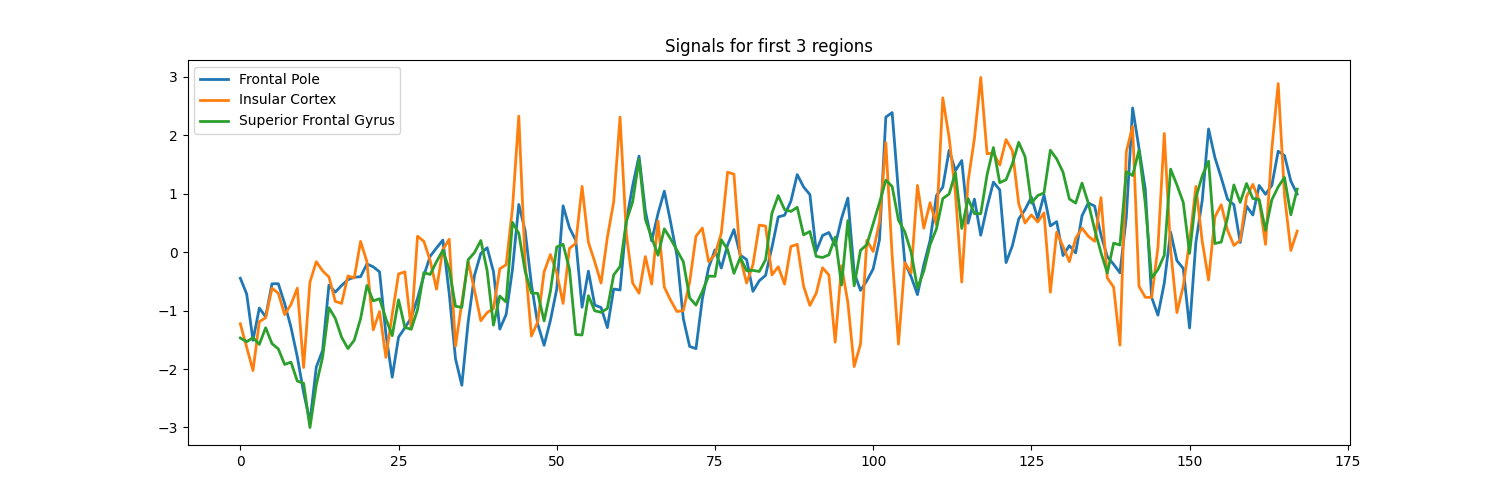
signals_df[["Frontal Pole", "Insular Cortex", "Superior Frontal Gyrus"]].plot(
    title="Signals from 3 regions", figsize=(15, 5)
)

show()
[NiftiLabelsMasker.wrapped] Loading data from sub-pixar123_task-...
[NiftiLabelsMasker.wrapped] Extracting region signals
[NiftiLabelsMasker.wrapped] Cleaning extracted signals
   Frontal Pole  Insular Cortex  ...  Supracalcarine Cortex  Occipital Pole
0      0.786647       -0.475993  ...              -3.151791       -1.222847
1      0.427424       -0.940412  ...              -1.680400       -1.668592
2     -0.598958       -1.404831  ...              -0.357431       -1.359115
3      0.087524       -0.469319  ...               0.594483       -2.010538
4     -0.119027       -0.401370  ...               0.210600       -2.189545

[5 rows x 48 columns]
Total running time of the script: (0 minutes 5.946 seconds)
Estimated memory usage: 333 MB
