Note
Go to the end to download the full example code. or to run this example in your browser via Binder
Independent Component Analysis (ICA) of NeuroVault maps
This example shows how to download statistical maps from
NeuroVault
with fetch_neurovault,
label them with Neurosynth terms,
and then compute Independent Component Analysis
(ICA) components across all the downloaded
statistical maps.
Note
This example is modified from code originally authored by Chris Gorgolewski and Gaël Varoquaux and available at neurovault_analysis.
Get image and associated term data
First, we download statistical images from NeuroVault. To reduce computational time we download only 30 images, but note that using more images will provide better results.
Each statistical image is associated with a set of
Neurosynth
terms (or vocabulary) which describe the analysis.
For example, a study may be associated with terms such as
“motor” or “working memory.”
We will also download these terms for analysis.
import numpy as np

from nilearn.datasets import fetch_neurovault

nv_data = fetch_neurovault(
    max_images=30, fetch_neurosynth_words=True, timeout=30.0
)

images = nv_data["images"]
term_weights = nv_data["word_frequencies"]
vocabulary = nv_data["vocabulary"]

# Neurosynth occasionally experiences stability issues ;
# we aim to quickly alert if images cannot be downloaded.
if term_weights is None:
    term_weights = np.ones((len(images), 2))
    vocabulary = np.asarray(["Neurosynth is down", "Please try again later"])
[fetch_neurovault] Dataset directory found: /home/runner/work/nilearn/nilearn/nilearn_data/neurovault
[fetch_neurovault] Reading local neurovault data.
[fetch_neurovault] Already fetched 1 image
[fetch_neurovault] Already fetched 2 images
[fetch_neurovault] Already fetched 3 images
[fetch_neurovault] Already fetched 4 images
[fetch_neurovault] Already fetched 5 images
[fetch_neurovault] Already fetched 6 images
[fetch_neurovault] Already fetched 7 images
[fetch_neurovault] Already fetched 8 images
[fetch_neurovault] Already fetched 9 images
[fetch_neurovault] Already fetched 10 images
[fetch_neurovault] Already fetched 11 images
[fetch_neurovault] Already fetched 12 images
[fetch_neurovault] Already fetched 13 images
[fetch_neurovault] Already fetched 14 images
[fetch_neurovault] Already fetched 15 images
[fetch_neurovault] Already fetched 16 images
[fetch_neurovault] Already fetched 17 images
[fetch_neurovault] Already fetched 18 images
[fetch_neurovault] Already fetched 19 images
[fetch_neurovault] Already fetched 20 images
[fetch_neurovault] Already fetched 21 images
[fetch_neurovault] Already fetched 22 images
[fetch_neurovault] Already fetched 23 images
[fetch_neurovault] Already fetched 24 images
[fetch_neurovault] Already fetched 25 images
[fetch_neurovault] Already fetched 26 images
[fetch_neurovault] Already fetched 27 images
[fetch_neurovault] Already fetched 28 images
[fetch_neurovault] Already fetched 29 images
[fetch_neurovault] Already fetched 30 images
[fetch_neurovault] 30 images found on local disk.
[fetch_neurovault] Computing word features.
[fetch_neurovault] Computing word features done; vocabulary size: 1315
After downloading, clean and report term scores.
term_weights[term_weights < 0] = 0
total_scores = np.mean(term_weights, axis=0)

print("\nTop 10 neurosynth terms from downloaded images:\n")

for term_idx in np.argsort(total_scores)[-10:][::-1]:
    print(vocabulary[term_idx])
Top 10 neurosynth terms from downloaded images:

task
superior temporal
parietal
tasks
posterior superior
working memory
auditory
superior
working
temporal sulcus
Reshape and mask images
As each statistical image comes from a different study, we apply some light preprocessing to improve our ability to compare them.
We use a NiftiMasker to
extract all image data within an MNI brain mask,
accessed via load_mni152_brain_mask.
import warnings

from nilearn.datasets import load_mni152_brain_mask
from nilearn.image import smooth_img
from nilearn.maskers import NiftiMasker

mask_img = load_mni152_brain_mask(resolution=2)
masker = NiftiMasker(mask_img=mask_img, memory="nilearn_cache", memory_level=1)
masker = masker.fit()

# Images may fail to be transformed, and are of different shapes,
# so we need to transform one-by-one and keep track of failures.
X = []
is_usable = np.ones((len(images),), dtype=bool)

for index, image_path in enumerate(images):
    # load image and remove nan and inf values.
    # applying smooth_img to an image with ``FWHM=None`` simply cleans up
    # non-finite values but otherwise doesn't modify the image.
    image = smooth_img(image_path, fwhm=None)
    try:
        with warnings.catch_warnings():
            warnings.simplefilter("ignore")
            X.append(masker.transform(image))
    except Exception as e:
        meta = nv_data["images_meta"][index]
        print(
            f"Failed to mask/reshape image: id: {meta.get('id')}; "
            f"name: '{meta.get('name')}'; "
            f"collection: {meta.get('collection_id')}; error: {e}"
        )
        is_usable[index] = False

# Now reshape list into 2D matrix, and remove failed images from terms
X = np.vstack(X)
term_weights = term_weights[is_usable, :]
Run ICA and map components to terms
Once we have all statistical images processed into a single 2D matrix,
we can use sklearn.decomposition.FastICA
to extract ICA components for this sample of images.
In this example, we are using a very small number of images
(i.e., only 30), so we explicitly pass n_components
to solve for a small number of components.
In real data analysis, we may want to instead set
n_components=None to find as many components as the rank of the data.
For more detail on ICA, please refer to the
scikit-learn user guide.
from sklearn.decomposition import FastICA

n_components = 3
fast_ica = FastICA(n_components=n_components, random_state=0)
ica_maps = fast_ica.fit_transform(X.T).T

term_weights_for_components = np.dot(fast_ica.components_, term_weights)
Generate figures
Finally, plot the generated ICA maps and their loadings on
the associated term_weights.
from scipy import stats

from nilearn.plotting import plot_stat_map, show

for index, (ic_map, ic_terms) in enumerate(
    zip(ica_maps, term_weights_for_components, strict=False)
):
    if -ic_map.min() > ic_map.max():
        # Flip the map's sign for prettiness
        ic_map = -ic_map
        ic_terms = -ic_terms

    ic_threshold = stats.scoreatpercentile(np.abs(ic_map), 90)
    ic_img = masker.inverse_transform(ic_map)
    important_terms = vocabulary[np.argsort(ic_terms)[-3:]]
    title = f"IC{int(index)}  {', '.join(important_terms[::-1])}"

    plot_stat_map(ic_img, threshold=ic_threshold, colorbar=False, title=title)

show()
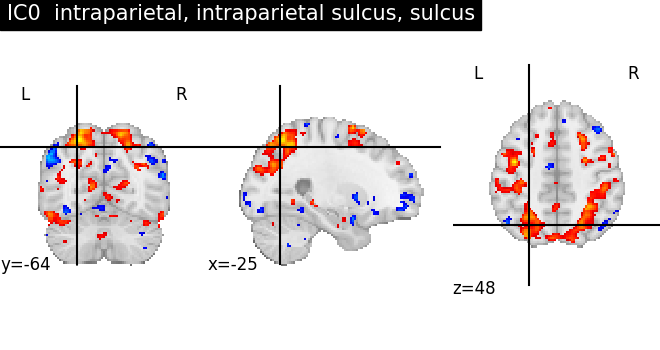
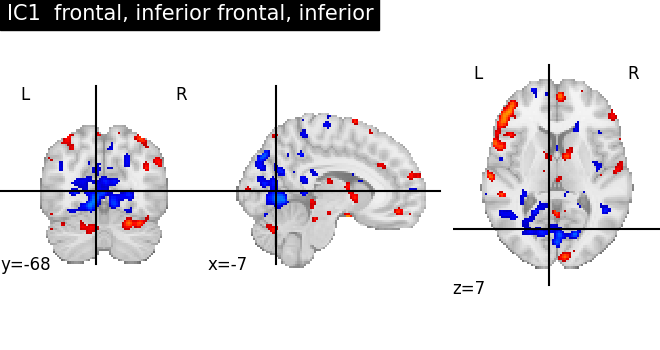
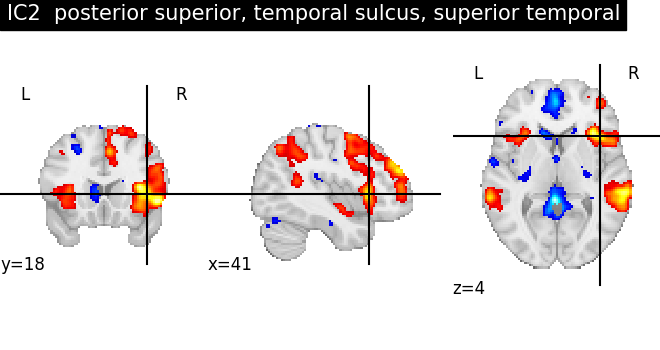
As we can see, some of the components capture cognitive or neurological maps, while other capture noise in the database. More data, better filtering, and better cognitive labels would give better maps.
Total running time of the script: (0 minutes 10.998 seconds)
Estimated memory usage: 385 MB
